If you are learning French, you know that the grammar is hard. But do you know what’s even harder? Typing.
As a lifelong QWERTY user, switching my keyboard layout to French (AZERTY) felt like trying to write with my left hand while blindfolded. I would try to type “qui” and end up typing “auj”. I would reach for a period . and accidentally hold down Shift just to find a semicolon ;.
And don’t even get me started on the accents. On a French keyboard, é, è, ç, and à are scattered across the number row.
I needed a way to retrain my muscle memory without frustration. Existing typing tools were too generic or didn’t focus on the specific pain points of the English-to-French transition.
So, I built my own.
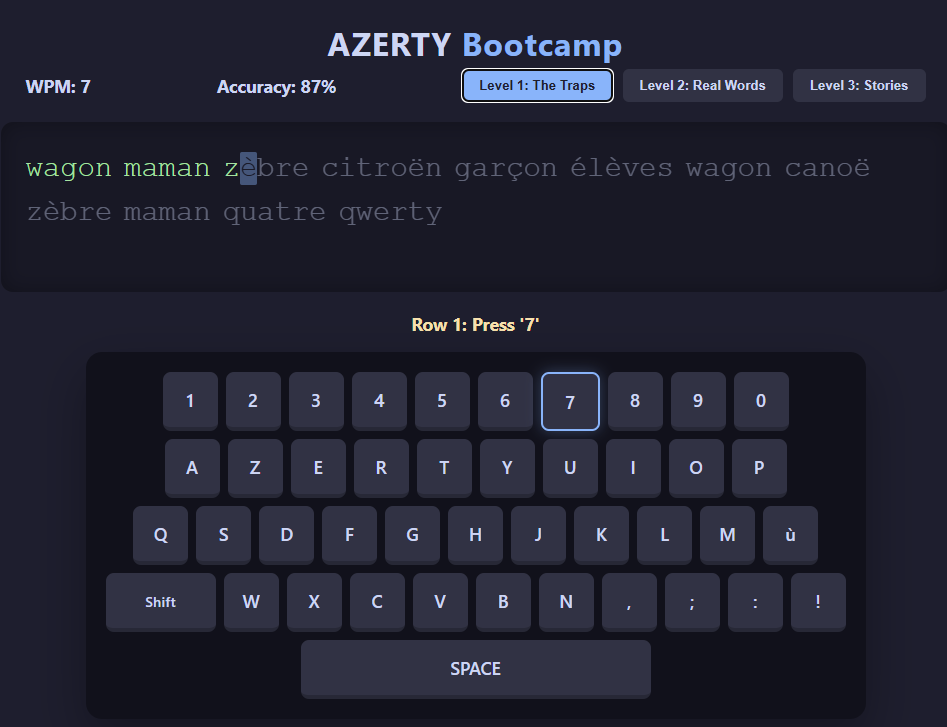
Introducing: AZERTY Bootcamp
I developed a simple, web-based application designed specifically to help QWERTY users master the French layout.
How it Works
The app isn’t just a standard typing test. It is broken down into three specific stages of mastery:
1. Level 1: The Traps
This level targets the muscle memory “glitches.” It focuses on the letters that physically move positions between the two layouts: A, Q, Z, W, and M. It forces your brain to stop reaching for the top-left corner when you see a ‘Q’.
2. Level 2: Accents & Trémas
French requires agility with the number row. This level introduces common words containing é, è, ç, and the tricky “Dead Keys” like ë and ï (which require a sequence of key presses).
3. Level 3: Real Literature
Once you know the keys, you need flow. This level serves up excerpts from famous French literature—Victor Hugo, Jules Verne, Albert Camus, and more—allowing you to practice sentence structure and punctuation in context.
The “Smart Hint” System
The hardest part of AZERTY is the hidden characters. How do you type œ? How do you type ë?
I built a Smart Hint system into the app. If you are stuck on a character, a notification pops up telling you exactly what to do (e.g., “Hold Shift + ^, release, then press e”). It removes the guesswork so you can focus on speed.
Give it a try!
Whether you are a French student struggling with your essays or just curious about how the other half of the world types, give it a shot.
Don’t forget to switch your operating system’s keyboard input to French before you start!